Keyboards
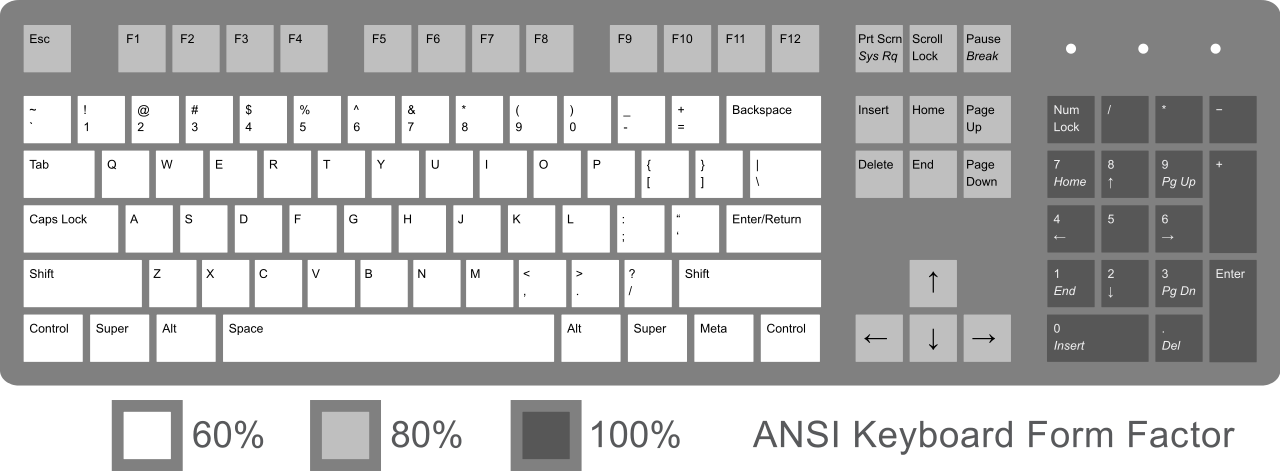
ANSI Keyboard Layout With Form Factor
Should you have only one device to interact with your computers, keyboard is definitively a good choice.
Touch devices require rare raw material, and are hard to maintain during time.
Galaxie Clan Keyboards
Specs
The ideal feature set for keyboards from our point of view would be:
Waterproof
The keyboard should support outdoor environment exposition during long period with minimal intervention, and stay functional.
Hotswap keys
No need to replace the entire keyboard for one touch it cause trouble. Keys have to be hot swappable. Spare key’s can be useful.
Capability change keys caps
Capability to use custom layout like FR, DE or ES is required, the flat key like DSA Profile.
Bluetooth
Unfortunally wireless requires battery that can be a source of trouble over time. If Bluetooth is present, care aboue the battery replacement, or the ability to use it also in a wired mode.
Arrows key
Arrow keys are required for the keyboard, that excludes a certain amount of keyboard form factor. A console without Arrow key is less fun.
Small form factor
The fact we target a small case box as enclosure mean size of devices is important. A full size keyboard is normaly excluded. 65%, 75%, 80% look to be a good compromise (40% and 60% seems too small).
Noise
With the apability to change keys, mechanical keyboard jump in the selection. Our target will be the less noise possible. Low profile mechanical can help to reduce the noise produced.
Mechanical keyboards
65% KeyChron K6
ANSI Layout
White Blacklight
Bluetooth and Wired
Hotswappable
Have two function keys
70% KeyChron K14
ANSI Layout
White Blacklight
Bluetooth and Wired
Hotswappable
Have two function keys
Keychron keyboard configuration
Keychron Keyboards on GNU/Linux use the hid_apple kernel module, both in Bluetooth and Wired modes.
By default, this module uses the F(unction)-keys as multimedia shortcuts and you have to press Fn + F-key to get the usual F1 through F12 keys.
In order to change this, you need to change the fnmode parameter for the hid_apple kernel module.
fnmode values
0 = disabledDisables the
fnkey.Pressing
fn + F8will behave like you only pressF8
1 = fkeyslastFunction keys are used as last key.
Pressing
F8key will act as a special key.Pressing
fn + F8will behave like aF8.
2 = fkeysfirstFunction keys are used as first key.
Pressing
F8key will behave like aF8.Pressing
fn + F8will act as special key (play/pause).
	echo "options hid_apple fnmode=2 swap_fn_leftctrl=0 swap_opt_cmd=1" | sudo tee /etc/modprobe.d/hid_apple.conf
	sudo update-initramfs -u
	sudo systemctl reboot